Workflow Conditional Paths
Branch workflows with Switch (true/false) and Mapping (ordered rules and default); configure conditions using args from the previous step.
This guide explains how to use the Switch and Mapping workflow components to branch execution: what you configure on each node, how to connect them on the graph, and how conditions use the args payload from the previous step.
When to Use Switch vs Mapping
| Use | When |
|---|---|
Switch | You need a single yes/no decision. One condition; the run follows either the True or the False outgoing connection. |
Mapping | You need several possible targets with ordered rules (first match wins), plus an optional fallback when no rule matches. |
Switch
What It Does
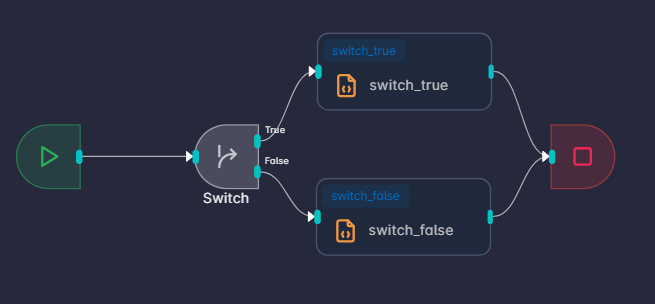
Switch evaluates one expression. Depending on the result, execution continues along the connection from True or from False.
Add and Wire the Node
- Open the workflow graph editor for your workflow.
- Add
Switchfrom the component palette and place it on the canvas. - Connect the input (left) from the previous step so
argsreflects that step’s output. - Connect the True handle (upper right) to the next node you want when the condition is true.
- Connect the False handle (lower right) to the next node you want when the condition is false.
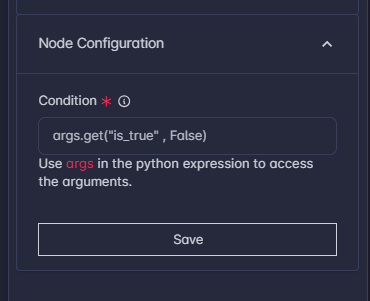
- Select the node, open Node Configuration, and set Condition (required).
- Save the workflow.
Field: Condition
A single expression that uses args (see Conditions and args below for allowed functions and operators). Examples:
args.get("approved") is Trueargs.get("score", 0) >= 80len(args.get("items", [])) > 0True and False Connections: If there is no outgoing edge on the side the run would take (True or False), that branch has nowhere to go—connect both sides to the nodes you intend to use.
Mapping
What It Does
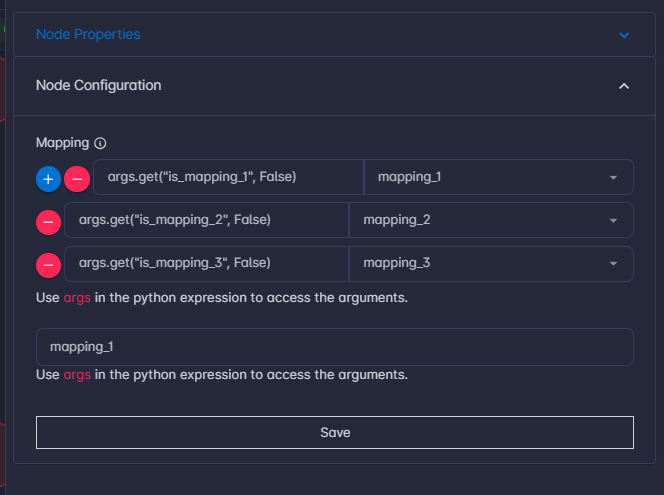
Mapping evaluates multiple conditions in order. The first condition that is true sends the run to that row’s to target. If none of the conditions are true, the run uses Default.
Execution only continues along a branch if there is a real connection on the graph from this Mapping node to the chosen target node.
Add and Wire the Node
- Add
Mappingfrom the palette and connect its input from the previous step. - From
Mapping’s output, draw one edge to each downstream node that might be selected (every branch you reference in the table, including the fallback). - Open Node Configuration and fill
Mappingand Default. - Save the workflow.
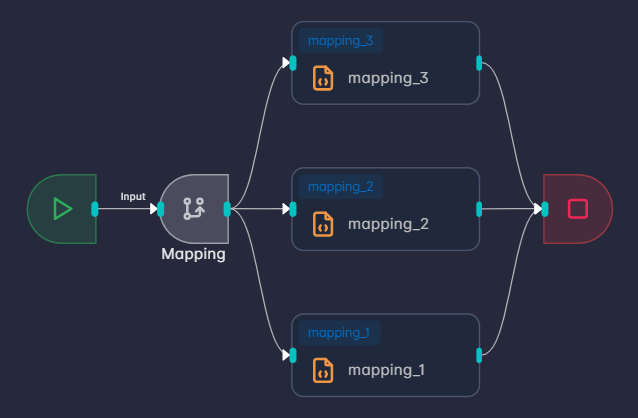
Connect Edges Before Mapping Rows: The to column is filled from a dropdown listing nodes already connected from this
Mappingnode. Connect edges first, then add mapping rows and pick to for each row.
Deleting Edge: After deleting any edge, ensure the mapping is updated to exclude the deleted edge row from the node configuration.
Field: Mapping
A table where each row has:
- condition — Expression using
args(same rules as in Conditions and args below). - to — The next node for this row, chosen from the dropdown (only outgoing targets appear).
Order matters: Put more specific rules above broader ones. The first matching row wins.
Example rows (illustrative—your to values come from the dropdown):
| condition | to |
|---|---|
args.get("status") == "urgent" | (node: Urgent handler) |
args.get("status") == "normal" | (node: Normal handler) |
Field: Default
Default Field: The node to use when no mapping row’s condition is true. Enter the same technical node identifier the graph uses for that target—this must match an existing edge from
Mappingto that node.
If Default is empty or does not match a connected target, the run may not continue on a defined branch when no row matches.
Examples
Route by string:
args.get("region") == "EU"Route by numeric tier:
int(args.get("tier", 0)) >= 2Catch-all last row: Add a final row with condition True and to set to your “everything else” node, or rely on Default for the fallback (still connect Mapping to that node with an edge).
Conditions and args
Both components evaluate conditions as Python-like expressions in a restricted environment:
- Use
argsto read the payload from the previous node. Treat it like structured, JSON-like data; use.get("key")and defaults where helpful. - You can use comparisons (
==,!=,<,>,in, and so on), logical operators (and,or,not), and parentheses. - These functions are available if you need them:
len,int,float,str,bool,abs,min,max,sum,round,any,all.
Do not rely on importing modules or calling arbitrary functions inside a condition; keep expressions small and readable.
Switch: The condition must evaluate to something true or false in the usual sense. If it is true, the run uses the True output; otherwise the False output.
Mapping: Each row has its own condition. Rows are checked from top to bottom; the first condition that evaluates to true selects that row’s target. If no row matches, the run uses Default.