

Workflow Resources
Workflow-scoped resources — types, configuration, per-type reference, and workflow file parameters.
1. Concepts and Identifiers
What Is a Resource? A workflow resource is a workflow-scoped configuration object (connection settings, uploaded files, or ephemeral file state) that nodes can reuse at run time. Credentials and shared settings live in one place instead of being duplicated on every node.
You will encounter two main identifiers:
| Identifier | Meaning |
|---|---|
resource_id | User-chosen string, unique within the workflow. Nodes reference this value in their parameters (per component conventions). |
resource_type | Registry key for the implementation (for example database, s3). Must match a key in registered_resources in api/apps/utils/SandsFlow/components/__init__.py. |
2. Resource Catalog
All types below are registered in SandsFlow.
Type ID (resource_type) | Display Name | Typical Use |
|---|---|---|
temporary_file | Temporary File | Run-scoped temp files; file uploads via workflow parameters; access by generated file ID. |
persistent_file | Persistent File | Design-time uploads stored under the workflow folder; nodes resolve paths by file_id. |
database | Database (PostgreSQL/MySQL) | SQL connections, queries, transactions. |
mongodb | MongoDB | Document CRUD operations. |
redis | Redis | Key/value get/set and related commands. |
s3 | Amazon S3 | Object storage (AWS or S3-compatible via optional endpoint). |
azure_blob | Azure Blob Storage | Blobs in a default or per-call container. |
rabbitmq | RabbitMQ | Publish/consume, declare queues and exchanges. |
kafka | Apache Kafka | Produce/consume topics, list topics. |
minio | MinIO | S3-compatible object storage. |
nextcloud | Nextcloud | Files via WebDAV-style API (upload, download, list, delete, exists). |
3. Set Up Resource
In the workflow graph editor, open Workflow Resources from the left sidebar: click the + (plus) on the right side of the Resources row (next to the resource count).

That opens the Workflow Resources dialog, where you set Resource ID, Resource Type, any extra fields for the chosen type, and Add Resource.
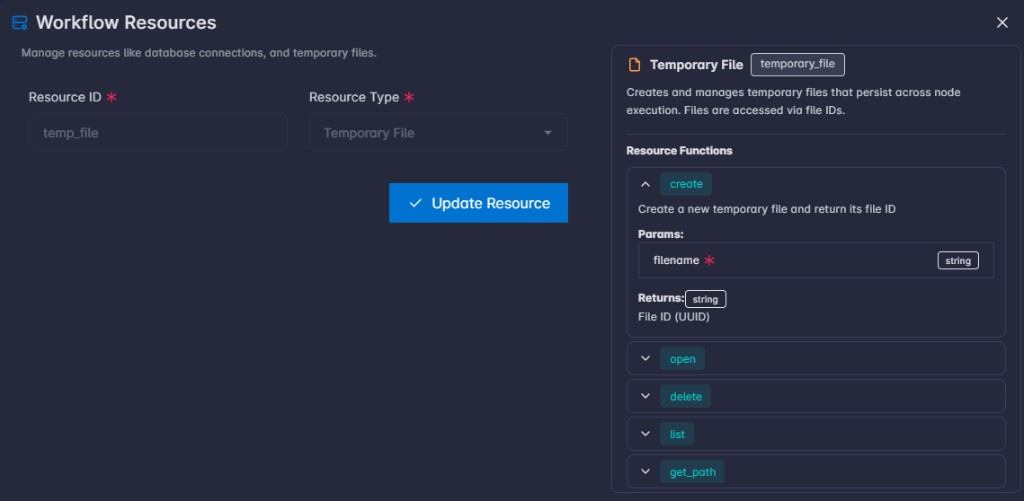
Selecting a Resource Type updates the Resource Info panel with that resource’s metadata: a short description and the Resource Functions you can use with that resource. Expand a function to see its parameters and return type.
4. Per-Type Reference
For each type: Configuration lists config_schema fields shown in the editor. Runtime Functions are the methods exposed to node code (metadata functions); at execution time they are invoked on a wrapper that injects internal context. Each function row lists Description, Params, and Returns.
4.1 temporary_file — Temporary File
Description: Creates and manages temporary files for the duration of a workflow run. Files are tracked by a file_id (UUID). Typical uses: scratch output, intermediate artifacts, and workflow file parameters (the engine registers uploads against the matching temporary_file resource before nodes run). For how the SandsBytes node uses temporary_file for HTTP file parameters (resource id vs file_id), see SandsBytes workflow node — user guide.
Configuration (config_schema): None (empty). No extra fields in the resource form beyond Resource ID and Resource Type.
Runtime Functions:
| Function | Description | Params | Returns |
|---|---|---|---|
create | Create a new empty temporary file and register it. |
|
|
open | Open a file by file_id. |
|
|
delete | Remove the file from disk and drop it from tracking. |
|
|
list | List files tracked for this resource in the current run. |
|
|
get_path | Absolute filesystem path for a file_id. |
|
|
Behavior: duplicate filenames in the same temporary resource raise FileExistsError. create writes an empty file (text-mode touch); use open(..., "wb") (or other modes) when you need binary or overwrite semantics.
Note: Temporary files for this resource are deleted when the workflow finishes (success or failure): lifecycle hooks remove all tracked files for that resource (same as calling
deletefor each). Do not rely on temp files after the run ends; copy anything you must keep to a persistent store orpersistent_fileresource.
Note: One
temporary_fileresource can store many files in the same run; each file has its own file ID. Create files withcreate(or rely on engine injection for uploads), and uselistto see what this resource is tracking.
Example:
def main(args, resources):
    tmp = resources.get("scratch")
    file_id = tmp.create("hello.txt")
    with tmp.open(file_id, mode="w") as f:
        f.write("hello")
    with tmp.open(file_id, mode="r") as f:
        content = f.read()
    return {"file_id": file_id, "content": content, "listed": tmp.list()}
4.2 persistent_file — Persistent File
Description: Stores one or more files at design time (uploads in the resource editor). At run time you address each file by file_id (UUID) stored in config.files (the id field on each file entry). You may also create empty files at run time; they are appended to the in-memory config.files list for that execution (whether that survives beyond the run depends on how your deployment persists workflow definitions).
Configuration (config_schema):
| Field ID | Label | Type | Required | Default | Description |
|---|---|---|---|---|---|
files | Files | file (multiple) | No | — | Upload one or more files; each entry gets an id (file_id) for use in nodes. |
Runtime Functions:
| Function | Description | Params | Returns |
|---|---|---|---|
create | Create an empty persistent file on disk and register metadata. |
|
|
delete | Remove the file from disk and from config.files. |
|
|
list | List file entries known to this resource. |
|
|
get_path | Absolute path for a known file_id. |
|
|
open | Open by file_id. |
|
|
Example:
def main(args, resources):
    docs = resources.get("policy_pdfs")
    file_id = "your-file-id-from-resource-config"
    path    = docs.get_path(file_id)
    with docs.open(file_id, mode="rb") as f:
        data = f.read()
    return {"path": path, "size": len(data)}
4.3 database — Database (PostgreSQL/MySQL)
Description: Connect to PostgreSQL or MySQL databases. Execute queries, fetch results, and manage transactions.
Configuration (config_schema):
| Field ID | Label | Type | Required | Default | Description |
|---|---|---|---|---|---|
db_type | Database Type | select | Yes | postgresql | postgresql or mysql. |
host | Host | text | Yes | localhost | Database host. |
port | Port | number | Yes | 5432 | Port (5432 PostgreSQL, 3306 MySQL). |
database | Database Name | text | Yes | — | Database name. |
username | Username | text | Yes | — | DB user. |
password | Password | text | Yes | — | DB password. |
ssl_mode | SSL Mode | select | No | disable | disable, require, verify-ca, verify-full (PostgreSQL-oriented). |
Runtime Functions:
| Function | Description | Params | Returns |
|---|---|---|---|
connect | Establish a connection to the database. |
|
|
close | Close the database connection. |
|
|
execute | Execute a SQL statement (for example INSERT, UPDATE, DELETE). |
|
|
fetch_one | Run a SELECT and fetch a single row. |
|
|
fetch_all | Run a SELECT and fetch all rows. |
|
|
commit | Commit the current transaction. |
|
|
rollback | Roll back the current transaction. |
|
|
Example:
def main(args, resources):
    db = resources.get("orders_db")
    db.connect()
    try:
        rows = db.fetch_all(
            "SELECT id, name FROM customers WHERE active = %s",
            [True],
        )
        return {"customer_count": len(rows), "sample": rows[:5]}
    finally:
        db.close()
4.4 mongodb — MongoDB
Description: Connect to MongoDB databases. Insert, find, update, and delete documents.
Configuration (config_schema):
| Field ID | Label | Type | Required | Default | Description |
|---|---|---|---|---|---|
host | Host | text | Yes | localhost | MongoDB host. |
port | Port | number | Yes | 27017 | Port. |
database | Database Name | text | Yes | — | Database name. |
username | Username | text | No | — | Optional user. |
password | Password | text | No | — | Optional password. |
auth_source | Authentication Database | text | No | admin | Auth DB. |
Runtime Functions:
| Function | Description | Params | Returns |
|---|---|---|---|
connect | Establish a connection to MongoDB. |
|
|
close | Close the MongoDB connection. |
|
|
insert_one | Insert a single document into a collection. |
|
|
insert_many | Insert multiple documents into a collection. |
|
|
find_one | Find a single document in a collection. |
|
|
find_many | Find multiple documents in a collection. |
|
|
update_one | Update a single document in a collection. |
|
|
delete_one | Delete a single document from a collection. |
|
|
Example:
def main(args, resources):
    mongo = resources.get("app_mongo")
    mongo.connect()
    try:
        inserted_id = mongo.insert_one("items", {"name": "demo", "count": 1})
        doc         = mongo.find_one("items", {"name": "demo"})
        return {"inserted_id": inserted_id, "doc": doc}
    finally:
        mongo.close()
4.5 redis — Redis
Description: Connect to Redis servers. Get, set, and manage key-value pairs.
Configuration (config_schema):
| Field ID | Label | Type | Required | Default | Description |
|---|---|---|---|---|---|
host | Host | text | Yes | localhost | Redis host. |
port | Port | number | Yes | 6379 | Port. |
password | Password | text | No | — | Optional password. |
db | Database Number | number | No | 0 | DB index (0–15). |
ssl | Use SSL | switch | No | false | Enable SSL. |
Runtime Functions:
| Function | Description | Params | Returns |
|---|---|---|---|
connect | Establish a connection to Redis. |
|
|
close | Close the Redis connection. |
|
|
get | Get a value by key. |
|
|
set | Set a key-value pair. |
|
|
delete | Delete a key. |
|
|
exists | Check if a key exists. |
|
|
keys | Get keys matching a pattern. |
|
|
Example:
def main(args, resources):
    cache = resources.get("my_redis")
    cache.connect()
    try:
        cache.set("last_run", str(args.get("run_key", "")))
        value = cache.get("some_key")
        return {"cached": value}
    finally:
        cache.close()
4.6 s3 — Amazon S3
Description: Connect to Amazon S3. Upload, download, and manage objects in buckets (optional custom endpoint for S3-compatible services).
Configuration (config_schema):
| Field ID | Label | Type | Required | Default | Description |
|---|---|---|---|---|---|
access_key_id | Access Key ID | text | Yes | — | AWS access key. |
secret_access_key | Secret Access Key | text | Yes | — | AWS secret key. |
region | Region | text | Yes | us-east-1 | AWS region. |
endpoint_url | Endpoint URL | text | No | — | Custom endpoint (optional). |
Runtime Functions:
| Function | Description | Params | Returns |
|---|---|---|---|
connect | Validate S3 credentials and establish a client connection. |
|
|
upload | Upload an object to S3. |
|
|
download | Download an object from S3. |
|
|
delete | Delete an object from S3. |
|
|
list_objects | List objects in a bucket. |
|
|
exists | Check if an object exists in S3. |
|
|
Example:
def main(args, resources):
    store = resources.get("my_s3")
    store.connect()
    store.upload("my-bucket", "workflow/output.txt", "hello", content_type="text/plain")
    body = store.download("my-bucket", "workflow/output.txt")
    return {"body": body}
4.7 azure_blob — Azure Blob Storage
Description: Connect to Azure Blob Storage. Upload, download, and manage blobs in containers (default container in config).
Configuration (config_schema):
| Field ID | Label | Type | Required | Description |
|---|---|---|---|---|
account_name | Account Name | text | Yes | Storage account name. |
account_key | Account Key | text | Yes | Account key. |
container | Container Name | text | Yes | Default container. |
Runtime Functions:
| Function | Description | Params | Returns |
|---|---|---|---|
connect | Validate Azure Blob credentials and establish a client connection. |
|
|
upload | Upload a blob. |
|
|
download | Download a blob. |
|
|
delete | Delete a blob. |
|
|
list_blobs | List blobs in a container. |
|
|
exists | Check if a blob exists. |
|
|
Example:
def main(args, resources):
    blob = resources.get("azure_reports")
    blob.connect()
    blob.upload("daily-report.json", '{"ok": true}', content_type="application/json")
    text = blob.download("daily-report.json")
    return {"text": text}
4.8 rabbitmq — RabbitMQ
Description: Connect to RabbitMQ brokers. Publish and consume messages from queues.
Configuration (config_schema):
| Field ID | Label | Type | Required | Default | Description |
|---|---|---|---|---|---|
host | Host | text | Yes | localhost | Broker host. |
port | Port | number | Yes | 5672 | AMQP port. |
username | Username | text | Yes | guest | User. |
password | Password | text | Yes | guest | Password. |
vhost | Virtual Host | text | No | / | vhost. |
Runtime Functions:
| Function | Description | Params | Returns |
|---|---|---|---|
connect | Establish a connection to RabbitMQ. |
|
|
close | Close the RabbitMQ connection. |
|
|
publish | Publish a message to an exchange. |
|
|
consume | Consume messages from a queue (returns the first message). |
|
|
declare_queue | Declare a queue. |
|
|
declare_exchange | Declare an exchange. |
|
|
Example:
def main(args, resources):
    mq = resources.get("my_amqp")
    mq.connect()
    try:
        mq.declare_queue("workflow_jobs", durable=True)
        mq.publish("", "workflow_jobs", '{"task": "ping"}')
        msg = mq.consume("workflow_jobs", auto_ack=True)
        return {"message": msg}
    finally:
        mq.close()
4.9 kafka — Apache Kafka
Description: Connect to Apache Kafka brokers. Produce and consume messages from topics.
Configuration (config_schema):
| Field ID | Label | Type | Required | Default | Description |
|---|---|---|---|---|---|
bootstrap_servers | Bootstrap Servers | text | Yes | localhost:9092 | Comma-separated brokers. |
security_protocol | Security Protocol | select | No | PLAINTEXT | PLAINTEXT, SSL, SASL_PLAINTEXT, SASL_SSL. |
sasl_mechanism | SASL Mechanism | select | No | PLAIN | PLAIN, SCRAM-SHA-256, SCRAM-SHA-512. |
sasl_username | SASL Username | text | No | — | If using SASL. |
sasl_password | SASL Password | text | No | — | If using SASL. |
Runtime Functions:
| Function | Description | Params | Returns |
|---|---|---|---|
connect | Establish a connection to Kafka. |
|
|
close | Close the Kafka producer/consumer/admin clients. |
|
|
produce | Produce a message to a topic. |
|
|
consume | Consume messages from a topic. |
|
|
list_topics | List all available topics. |
|
|
Example:
def main(args, resources):
    k = resources.get("my_kafka")
    k.connect()
    try:
        k.produce("events", "hello-from-workflow", key="run-1")
        batch = k.consume("events", "python_code_group", timeout=1)
        return {"messages": batch[:5]}
    finally:
        k.close()
4.10 minio — MinIO
Description: Connect to MinIO object storage. Upload, download, and manage objects in buckets (S3-compatible API).
Configuration (config_schema):
| Field ID | Label | Type | Required | Default | Description |
|---|---|---|---|---|---|
endpoint | Endpoint | text | Yes | localhost:9000 | host:port. |
access_key | Access Key | text | Yes | — | Access key. |
secret_key | Secret Key | text | Yes | — | Secret key. |
secure | Use HTTPS | switch | No | false | Use TLS. |
Runtime Functions:
| Function | Description | Params | Returns |
|---|---|---|---|
connect | Validate MinIO credentials and establish a client connection. |
|
|
upload | Upload an object to MinIO. |
|
|
download | Download an object from MinIO. |
|
|
delete | Delete an object from MinIO. |
|
|
list_objects | List objects in a bucket. |
|
|
exists | Check if an object exists in MinIO. |
|
|
Example:
def main(args, resources):
    store = resources.get("minio_store")
    store.connect()
    store.upload("my-bucket", "runs/output.bin", b"\x00\x01", content_type="application/octet-stream")
    body = store.download("my-bucket", "runs/output.bin")
    return {"body": body}
4.11 nextcloud — Nextcloud
Description: Connect to Nextcloud servers. Upload, download, and manage files via WebDAV.
Configuration (config_schema):
| Field ID | Label | Type | Required | Description |
|---|---|---|---|---|
url | Nextcloud URL | text | Yes | Server base URL (for example https://cloud.example.com). |
username | Username | text | Yes | User name. |
password | Password | text | Yes | Password or app password. |
Runtime Functions:
| Function | Description | Params | Returns |
|---|---|---|---|
connect | Validate Nextcloud credentials and establish a session. |
|
|
upload | Upload a file to Nextcloud. |
|
|
download | Download a file from Nextcloud. |
|
|
delete | Delete a file from Nextcloud. |
|
|
list_files | List files in a directory. |
|
|
exists | Check if a file exists in Nextcloud. |
|
|
Example:
def main(args, resources):
    nc = resources.get("team_nextcloud")
    nc.connect()
    nc.upload("/Workflows/hello.txt", "hello")
    content = nc.download("/Workflows/hello.txt")
    names   = nc.list_files("/Workflows/")
    return {"content": content, "names": names}
5. Workflow Parameters and File Uploads
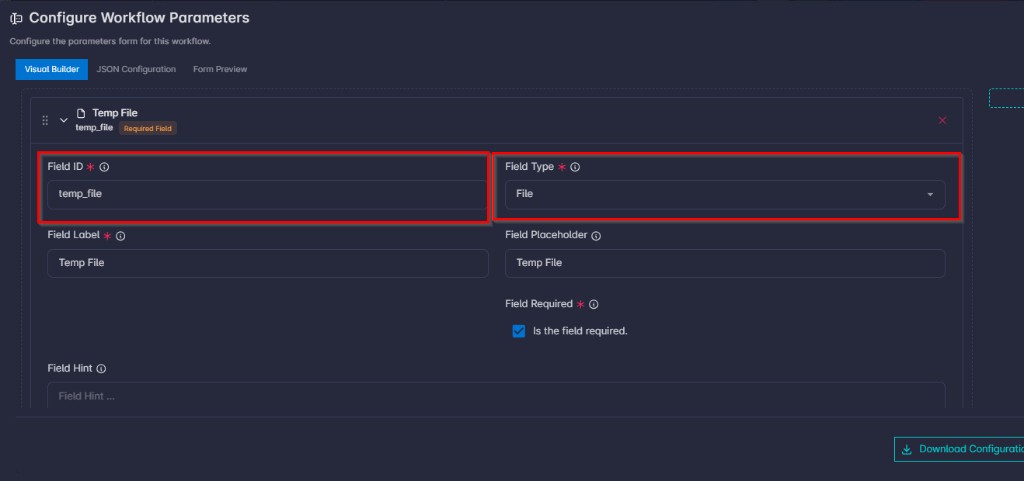
If the workflow params schema includes a field with type: file, then:
- The field’s
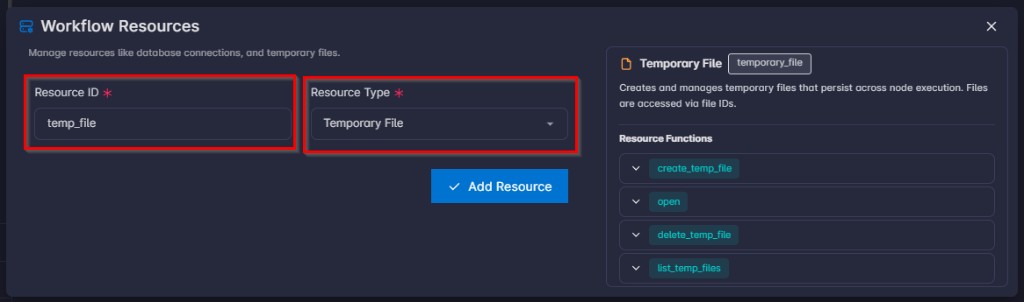
idmust match aresource_idon the workflow’sresourceslist.
- That resource must have
resource_typetemporary_file.
def main(args, resources):
    res = resources.get("temp_file")

    return args
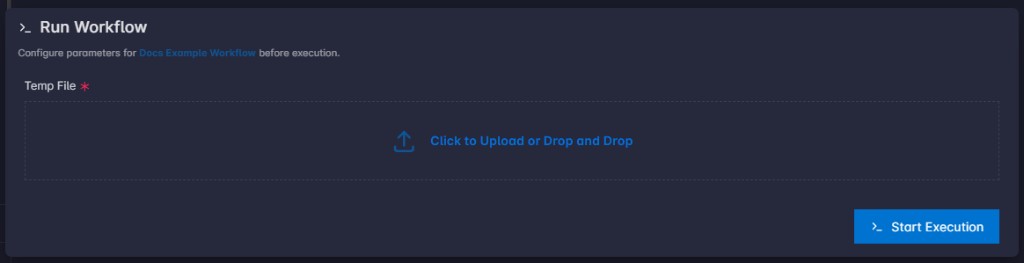
At run start, uploaded files for that parameter are written into the corresponding temporary file resource state (via TemporaryFileResource.create then open(..., "wb") in run_workflow), and the run params entry for that field becomes a list of file_id values (UUID strings).
If the resource is missing or not temporary_file, run_workflow raises ValueError with an explicit message.