

Deployment
Prepare the host, configure the environment, and start the SandsBytes container stack.
These steps deploy a self-hosted SandsBytes instance. Complete them in order.
Prerequisites
You need:
- Docker Engine and Docker Compose on the host. Install them before setup, or allow the setup action to install them.
package.tar.gz— product files and Docker images.product_key.tar.gz— license material and the nginx certificate.
Hardware
| Resource | Minimum | Recommended production |
|---|---|---|
| CPU | 6 cores | 12+ cores |
| RAM | 16 GB | 64 GB+ for large hunt workloads |
| Storage | 100 GB free | SSD or NVMe, sized to evidence volume |
For high-frequency ingestion, contact [email protected] for sizing.
Software
- Linux Ubuntu 20.04.6 LTS or later (64-bit).
- Google Chrome, Mozilla Firefox, or Microsoft Edge with JavaScript enabled.
- Internet access for the first dependency install. After that, internet is optional except for external feeds and enrichment.
Stack
| Component | Role |
|---|---|
| UI | Vue.js web application. |
| API | FastAPI backend. |
| Proxy | Nginx gateway. |
| Redis | Cache and Celery broker. |
| Celery | Background workers. |
| Elasticsearch | Hunt record index. |
| MariaDB | Application and case metadata. |
Configure environment variables
- Create a folder and place both archives in it.
- Extract them:
tar -xzf product_key.tar.gz
tar -xzf package.tar.gz- Edit
.env.override. Keep secret values off shared channels and out of git.
Secrets — set each to a unique strong value:
MARIADB_ROOT_PASSWORDMARIADB_PASSWORDAUTH_SECRET_KEYINTERNAL_EXECUTOR_TOKENSMTP_ENCRYPTION_KEY
Host IP — replace <host-ip> everywhere:
NGINX_API_HOST="<host-ip>"NGINX_UI_HOST="<host-ip>"VITE_APP_API_HOST="https://<host-ip>"VITE_APP_GATEWAY_HOST="<host-ip>"
Elasticsearch heap — about 50% of host RAM, capped at 32 GB:
ES_JAVA_OPTS='-Xms<size>g -Xmx<size>g'Example on a 32 GB host:
# ============ DB
MARIADB_ROOT_PASSWORD="changeme"
MARIADB_PASSWORD="changeme"

# =============== API
AUTH_SECRET_KEY="changeme"
INTERNAL_EXECUTOR_TOKEN="changeme"
SMTP_ENCRYPTION_KEY="changeme"

# =============== Nginx
NGINX_API_HOST="<host-ip>"
NGINX_UI_HOST="<host-ip>"

# ================= UI
VITE_APP_API_HOST="https://<host-ip>"
VITE_APP_GATEWAY_HOST="<host-ip>"

# ================= ES
ES_JAVA_OPTS='-Xms16g -Xmx16g'
Deploy (setup)
The product CLI is ./run.sh.
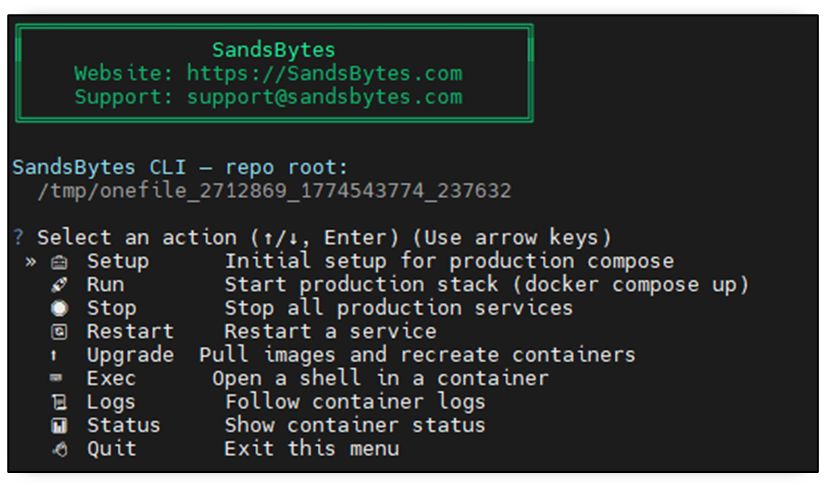
- Run
./run.shand choose Setup. - If Docker is missing, answer y to install Docker and Docker Compose. If Docker is already installed, answer N.

- Wait until image load finishes before you continue.
Run the platform
Start services:
./run.shChoose run.
Check status:
./run.shChoose status. Every container should show Up.
Open https://<host-ip> and sign in.
| Field | Default |
|---|---|
| Username | admin |
| Password | Password@123 |
Change the default password as soon as you sign in. Use the profile menu.
After startup, open Settings → System Information and confirm image versions. A 1.7.9 install shows 1.7.9 for UI, API, Proxy, DB, Redis, Celery, and Elasticsearch.
Stop the platform
./run.shChoose stop.
Deploy a new release
- Stop the current stack:
./run.sh→ stop. - Back up the old folder:
mv <package> <package>-backup. - Create a folder for the new release, copy in the new archives, and extract them.
- Load images:
./run.sh→ setup. - Upgrade:
./run.sh→ upgrade. When asked to restore data, answer Y and give the path to<package>-backup.
Troubleshooting
For one service:
./run.shChoose logs, then enter a service name such as api, celery, proxy, ui, redis, db, or es.
If the problem remains, contact customer support.