

SandsBytes Component
Use the SandsBytes component in SandsFlow.
This guide explains how to use the SandsBytes component in SandsFlow workflows: configuring it in the designer, passing arguments (including files via temporary file resource IDs), understanding outputs, and fixing common issues.
What The SandsBytes Component Does
The SandsBytes component calls a registered SandsBytes HTTP API (the same FastAPI routes the product exposes) from inside a workflow run. Each execution performs a real HTTP request to the configured path, using the workflow’s security context so the API runs as a specific user.
Use it whenever a workflow should trigger server actions without writing custom component code.
Configuring The Component (UI)
Endpoint (Required)
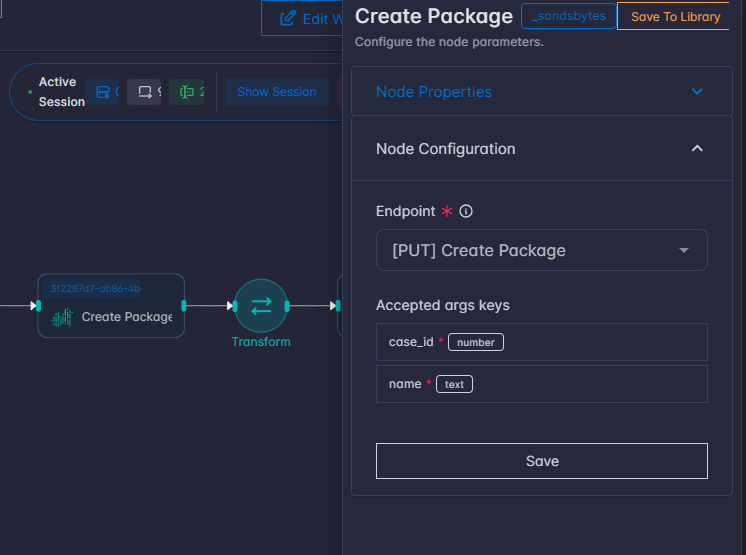
Open the component’s settings and choose Endpoint. Each option shows the HTTP method and route name; the stored value is the path string (for example /api/...).
You can search or type to match a path. You must select a valid path before the component can run.
Accepted Args Keys
When an endpoint is selected, a panel Accepted args keys appears. It summarizes, for that route only:
- Parameter names accepted by the API
- Types and required markers
- Default values where defined
- Allowed values for
select-style parameters
SandsBytes Component Arguments and API
At run time, args is a dictionary that flows from the previous node (or from Start for the first step after start). This is where API parameter values must appear.
Allowlist Behavior
Only keys that exist in the selected endpoint’s registered parameter list are sent to the API. Any other keys in args are ignored for the HTTP call.
Validation Before The Request
If the route metadata is available, the component validates:
- Required parameters (including path parameters with no default) are present in
args. selectparameters: the value must be one of the allowed options.
Failures produce clear error messages naming the endpoint and the problem.
Note: Often those IDs do not match API parameter names. Use a Transform node between Start and SandsBytes to map or build the exact keys the Accepted args keys panel shows.
Component Output
On success, the component returns a dictionary that:
- Copies all keys from the incoming
args(whenargswas a dict). - Adds one key:
sandsbytes— the HTTP response body as interpreted by the server:
- JSON responses — Usually a normal object or list.
- Non-JSON text — You may see a small object with
content(text) andstatus_code. - File download responses — An object with
file: true, Base64-encodedcontent,filename,content_type,size, andstatus_code.
Important: On HTTP error status (4xx/5xx), the component does not return a normal result: the task fails and the workflow surfaces an exception-style message (for example Authentication failed, Permission denied, Validation error, Server error, or Request failed for network issues).
File Upload To SandsBytes
SandsBytes never receives a raw file path from you for file-type API parameters. Instead, you pass a temporary_file workflow resource ID (a string). At run time the engine looks up tracked files for that resource in resource_state, reads the bytes, and sends them to the API.
Note: The value you put in
argsfor a file parameter is always the resource id (or a list of ids if the API allows multiple files), not a path on disk.
Steps
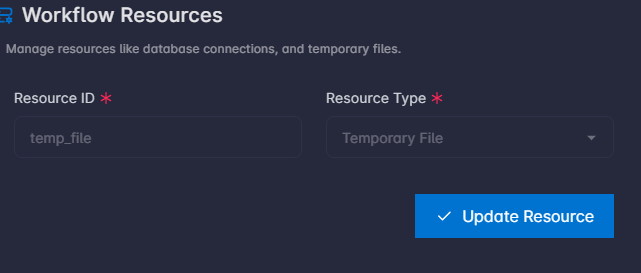
- Add a Temporary File resource in the workflow’s Resources UI.
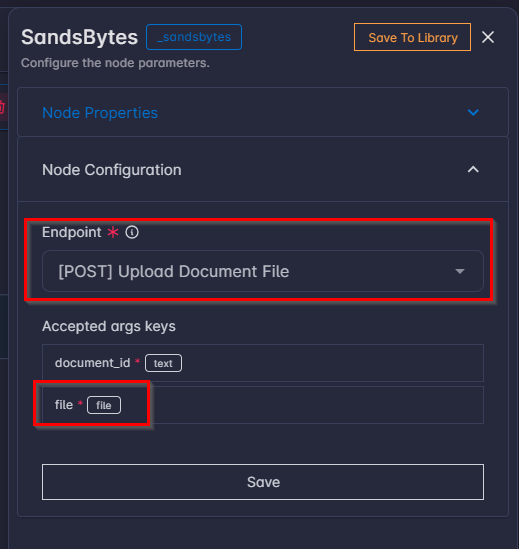
- Drop the SandsBytes component in the canvas, then select an endpoint with file upload (for example
[POST] Upload Document File), then check the parameter that requires a file.
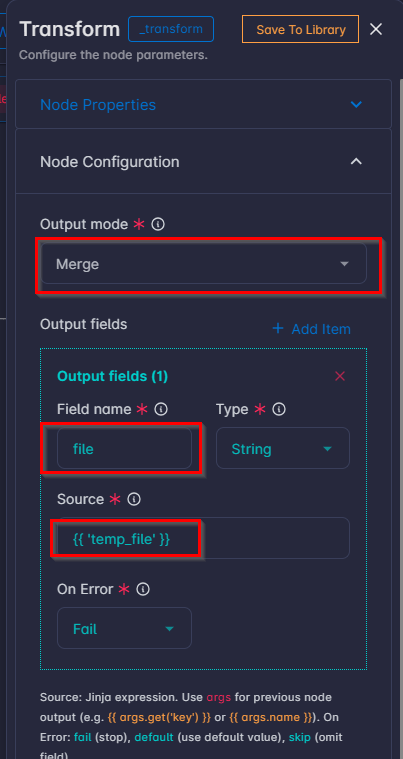
- Use a Transform component before the SandsBytes component to pass the temporary file
resource_idto SandsBytes asargs.
Troubleshooting (General)
| Symptom | What to check |
|---|---|
Missing required parameters for endpoint '…' | Add the listed parameters to args (correct names). Use Transform after Start if names differ. |
Invalid options for parameters for endpoint '…' | For select fields, use exactly one of the allowed values from Accepted args keys. |
endpoint is required | Save the component with an Endpoint selected. |
Acting user ID is required but not found | Run must be tied to a user (normal UI runs do this). Unusual contexts (custom runners) need to supply user context. |
Internal executor token not configured | Server INTERNAL_EXECUTOR_TOKEN (or equivalent) must be set by an administrator. |
Authentication failed / Permission denied / Validation error / Server error | The API rejected the call; inspect the message and the acting user’s permissions or payload. |
Keys in args seem ignored | They are not in that endpoint’s registered parameter list; rename or map them to the official names. |