

Settings
Platform health, identity, forms, hunt fields, templates, the content store, and the audit log.
Settings
Settings (/UI/settings) is where administrators configure the platform. The page is grouped into System, Configuration, and Platform.
System Health
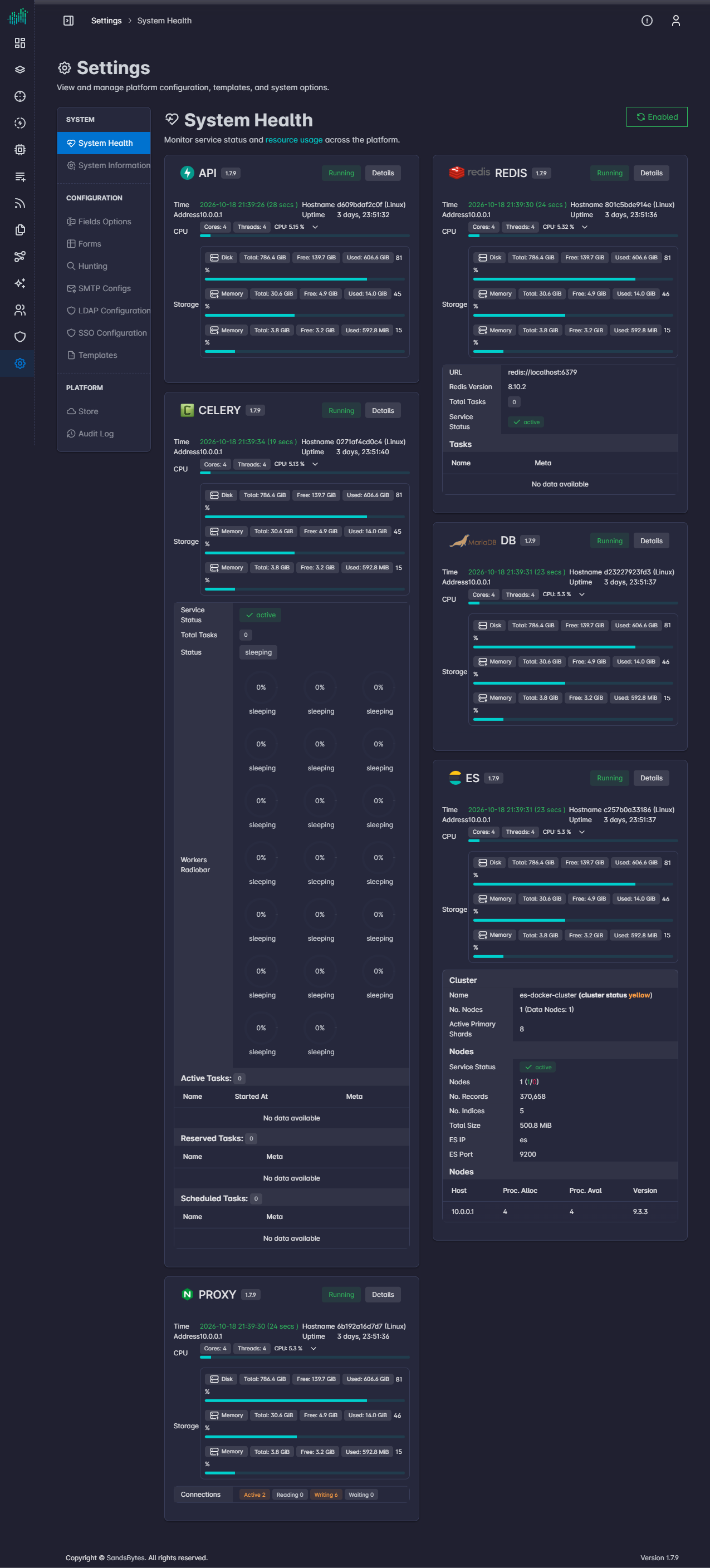
System Health shows each service: API, Celery, Proxy, Redis, DB, and Elasticsearch.
Each card shows the service version, whether it is running, and an Enabled control. Details adds time, hostname, address, uptime, CPU, disk, and memory.
- Celery also lists workers and active, reserved, and scheduled tasks.
- Proxy also lists connection counts (active, reading, writing, waiting).
- Redis also shows the Redis URL and Redis version.
System Information
System Information is read-only. Use it after a deploy to confirm what this instance is running.
| Block | What it shows |
|---|---|
| License | Product key location, instance id, expiration, and limits for users, packages, and workflows. Enabled modules are manage, investigate, and flow on a full license. |
| Service endpoints | Health addresses for API, Proxy, DB, Redis, Celery, and Elasticsearch. |
| API, Elasticsearch, Redis, DB, Celery, Proxy | Bind addresses, worker settings, database name and schema version, store URL, session expiration, and upload size limit. |
| Storage paths | Directories for cases, temp files, the store, parsers, enrichers, feeds, and documents. |
| Logs | Log path, file name, level, and rotation. |
| Docker image versions | Image version for UI, API, Proxy, DB, Redis, Celery, and Elasticsearch. |
Fields Options
Fields Options edits dropdown values used by forms. The tables list on the left selects an object. Iocs → Iocs types is the control for indicator types used on the IoCs page. Change the list and click Update.
Forms
Forms lists custom form layouts. Columns are Name, Standard, Author, Version, Active, Custom Fields, and Last Modified.
Default layouts ship for Cases, Evidences, Requirements, Tasks, Findings, Timeline, Remediations, Documents, Users, and Contributions. Open a layout to add custom fields. Those fields then appear on the matching create and edit forms.
Hunting
Hunting sets the primary fields for Apply view on each ECS category in Hunt. The page edits 43 field sets (Agent, File, Process, Event, and the other ECS categories) and saves them with Submit.
Hunt uses this list when an analyst applies a data-type view. See Start Hunting.
SMTP Configs
SMTP Configs stores outbound mail servers used by rule email actions. The list shows Name, Host, Port, From, and TLS. Click Create to add a server.
LDAP Configuration
LDAP Configuration turns on directory login.
| Field | Purpose |
|---|---|
| Enabled | Allow LDAP login. |
| Server URI | Directory server address. |
| Base DN | Search base for users. |
| User filter | LDAP filter that selects accounts allowed to sign in. |
| Validate TLS | Require a valid directory certificate. |
| TLS CA certificate | CA used when validation is on. |
| Bind DN and Bind password | Service account used to search the directory. |
| Group base DN | Where groups are searched. |
| Group strategy | How group membership is read. OpenLDAP is the default strategy. |
| Group role map | Maps a directory group to a SandsBytes role. Use Add for each mapping. |
Click Save. Sign-in behavior is described in Authentication.
SSO Configuration
SSO Configuration adds an identity provider. Supported protocols are OpenID Connect, OAuth 2.0, and SAML.
| Control | Purpose |
|---|---|
| Enable SSO | Turns SSO on for this platform. |
| Show Login with SSO | Shows Login with SSO on the login page. The button starts the identity-provider flow. |
| Allow SSO Only | Disables username/password and LDAP password login. Users must use SSO. Keep a break-glass admin session before enabling this. |
| Protocol | OIDC discovers endpoints from the issuer. OAuth 2.0 uses the URLs you enter. SAML uses identity-provider metadata. |
| Public base URL | External origin of this API (scheme, host, and optional port). SandsBytes builds the OAuth redirect URI and the SAML ACS and entity ID from this value. |
| UI base URL | UI origin used after the identity-provider callback to finish login. Leave blank to use the public base URL. |
| Username claim | Claim or SAML attribute that becomes the SandsBytes username. The default is preferred_username. It must be unique. An existing local or LDAP user with the same name blocks just-in-time provisioning. |
| Email claim | Claim that supplies email. The default is email. Required the first time an SSO user is created. |
| Groups claim | Claim that lists groups. The default is groups. Values are matched to Group role map entries. |
| Issuer URL | OIDC issuer base URL, with no path after the realm. |
| Group role map | Maps an identity-provider group to a local role. |
Save, then use Test Configuration and Open Test Login before you require SSO for everyone.
Templates
Templates holds the files used to generate case reports. Columns are Name, Category, File Type, Author, Version, Creation Date, and Created By.
Shipped case-report templates include PDF and DOCX, plus Arabic PDF and DOCX. Category is CASE_REPORT. Use Download to inspect a template and Create to add one. Case reports select a template from this list. See Report Generation.
Store
Store installs and updates content packages. Counts at the top are Installed, Outdated, and Total. The Parsers chip filters parser packages.
| Action | What it does |
|---|---|
| Download | Downloads the selected package. |
| Install / Update | Installs or upgrades the selection on this platform. |
| Import | Installs a package file you already have. |
The catalog comes from the store URL shown on System Information. An empty list means that URL is unset or unreachable.
Audit Log
Audit Log is the platform activity trail. Columns are Time, Message, Source, Actor, Action, Entity, Entity ID, and Case. Search and Filter narrow the list.
Source is user or system. Actions include LOGIN, UPDATE, and REPORT. Entities follow platform tables, such as cases, feeds, tasks, and reports.