

Actions
Automation rule action types (Email, Webhook, Workflow), choosing an action in the wizard, configuration, and payload templating.
When all conditions on the Conditions page pass—Active, time frame, and payload filter—the rule executes exactly one action.
Action Types Overview
| Action type | Typical use |
|---|---|
email | Send email using templates, recipients, and mail server settings. |
webhook | HTTP callback with URL, method, headers, and body (often derived from the event payload). |
workflow | Start or interact with a workflow according to handler configuration (for example selecting a workflow and parameters). |
Choosing an Action in the UI
On the Actions step of the create/edit rule stepper:
- Select Action type — one of the installed handler keys (for example email, webhook, workflow).
- Fill Action configuration — the form updates to show fields required for that type (URLs, templates, workflow pickers, JSON bodies, and similar).
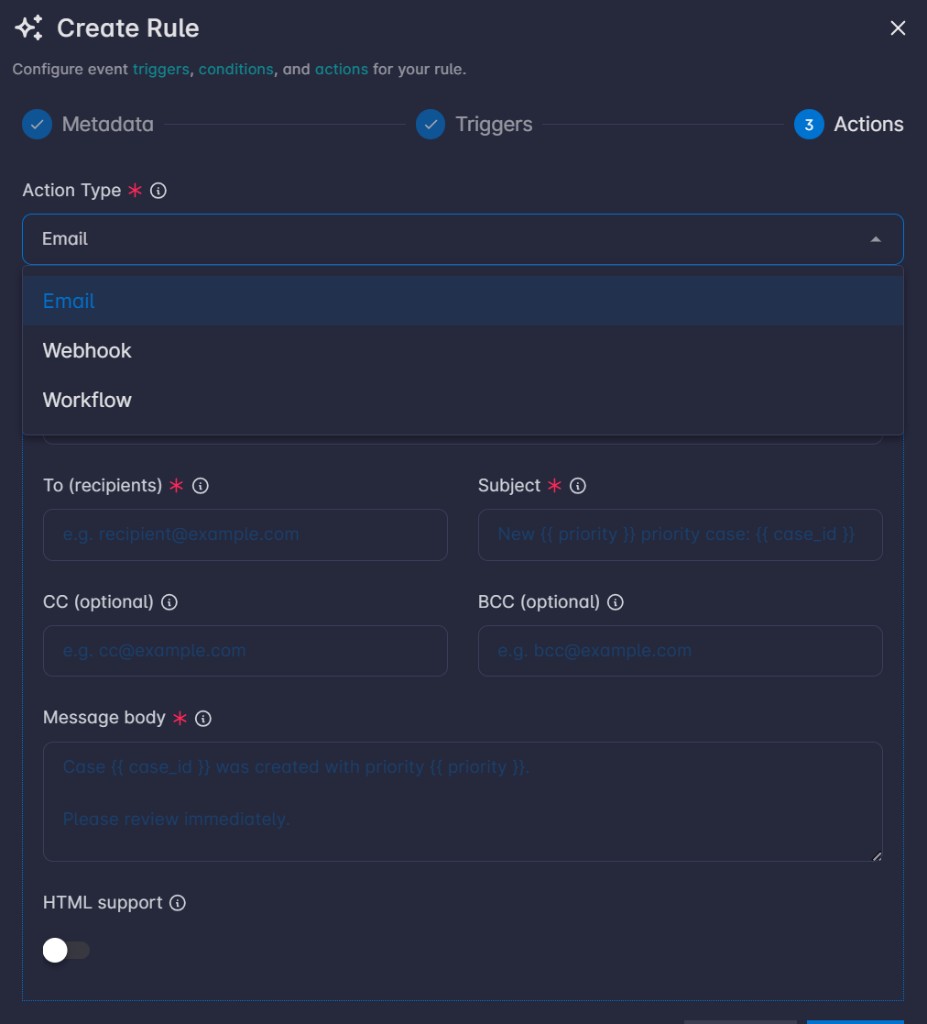
Config Rendering and Event Logs
How Jinja2 Rendering Works
Before the action runs, the platform renders the rule’s configurations (action_config) using Jinja2 templating. The event payload (the JSON data for the matched event) is provided as the template context, so expressions like {{ field_name }} are replaced with the corresponding values from that payload. If a referenced key is missing, it is substituted with an empty string.
After rendering, the resolved configuration is what the handler actually executes. A copy of that rendered action_config is stored in Rules Event Logs as part of the rule snapshot so you can audit exactly what was sent or invoked.
Example
Suppose the event payload includes case fields like this:
{
  "id": 86,
  "name": "test",
  "severity": "High"
}
You configure an email action with a Subject template:
New {{ severity }} priority case: {{ id }} — {{ name }}After Jinja2 rendering against the payload, the subject becomes:
New High priority case: 86 — testThe same idea applies to other templated fields (email body, webhook body, workflow parameter values): use Jinja2 syntax and keys that exist on the event payload (or nested paths your deployment exposes, such as {{ payload.field }} if that is how your context is structured).
Email (email)
Overview
Sends email through a saved SMTP configuration. The handler loads the SMTP profile, renders templates, and sends via the notifier email provider.
Fields
| Field | Description | Example |
|---|---|---|
SMTP configuration (smtp_config_id) | Required. Which SMTP profile to use (options come from your saved SMTP configs). | - |
To (to) | Required. One or more addresses; each entry can be a Jinja template. | ["alerts@example.com"] or ["{{ owner_email }}"] |
Subject (subject) | Required. | New case: {{ case_id }} |
CC (cc) | Optional. Same as To. | ["team@example.com"] |
BCC (bcc) | Optional. Same as To. | ["audit@example.com"] |
Message body (message) | Required. | Case {{ case_id }} was updated. Priority: {{ priority }} |
HTML support (html_support) | If on, body is sent as HTML; if off, plain text. | true to send HTML email |
Webhook (webhook)
Overview
Issues an HTTP request to a URL you configure. URL, query parameters, headers, and body can use Jinja2 with the event payload as context. Supports JSON, form, or raw body; optional retries and TLS verification.
Fields
| Field | Description | Example |
|---|---|---|
URL (url) | Required. Request URL. | https://api.example.com/hooks/incident or https://example.com/hook?id={{ record_id }} |
Method (method) | Required. HTTP verb. | POST |
Timeout (timeout) | Optional. Request timeout in seconds. Default 30. | 60 |
Max retries (max_retries) | Optional. Retries after the first failure. 0 = no retries. | 2 |
Query parameters (query_params) | Optional. List of { key, value }; values support Jinja. | [{"key":"source","value":"rules"},{"key":"id","value":"{{ id }}"}] |
Headers (headers) | Optional. List of { key, value }; values support Jinja. | [{"key":"Authorization","value":"Bearer {{ token }}"}] |
Body type (content_type) | How the body is sent: json, form, raw, or none. | json |
Body (JSON) (body_json) | Shown when body type is json. JSON string; Jinja inside string values after render. | {"event":"{{ event_type }}","id":"{{ id }}"} |
Raw body (raw_body) | Shown when body type is raw. | payload={{ id }} |
Body (form fields) (body_form) | Shown when body type is form. List of { key, value }. | [{"key":"status","value":"{{ status }}"}] |
TLS verify (tls_verify) | Verify TLS certificates. Default true. Use false only if you accept insecure endpoints. | false only if you accept insecure endpoints |
Workflow (workflow)
Overview
Starts a workflow run. You pick a workflow; if that workflow defines input parameters, a second subform appears to fill them. Those parameters are sent as the run’s form data (dicts and lists JSON-encoded).
Fields
| Field | Description | Example |
|---|---|---|
Workflow (workflow_id) | Required. The workflow to run (options from existing workflows). | - |
Workflow parameters (workflow_params) | Dynamic: only appears for the selected workflow. Fields and types match that workflow’s parameter schema in the database—not fixed globally. | If the workflow defines a text param case_id, set case_id to {{ case_id }} or a literal like 12345 |