

Cases
Case list
Browse, search, and open investigations.
Cases (/UI/cases/list) is the repository of every investigation you can access.
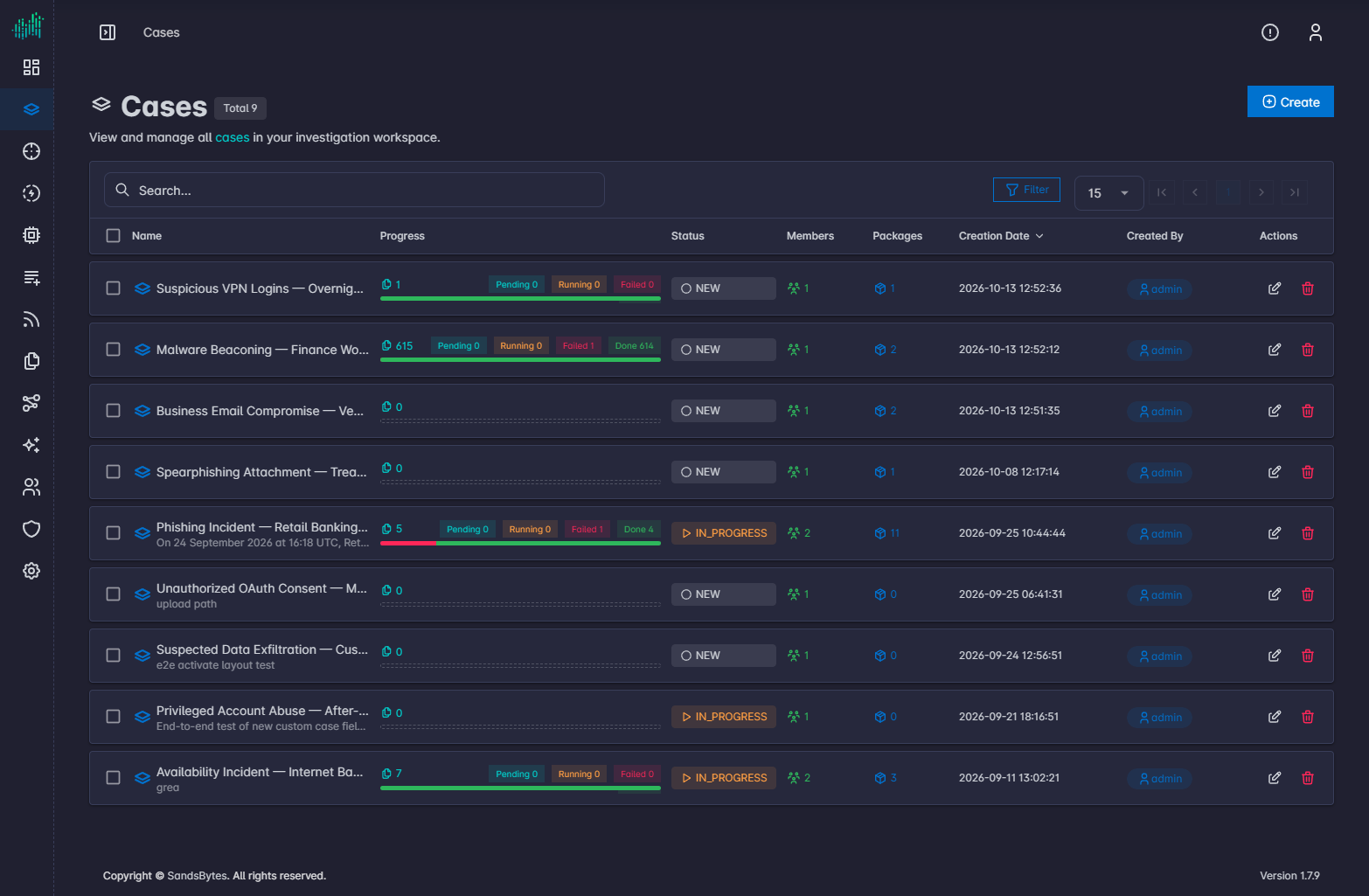
The heading shows Cases and the total count. The subtitle reads: View and manage all cases in your investigation workspace.
Toolbar
| Control | Purpose |
|---|---|
| Create | Opens the create form. |
| Search | Filters the table by text. |
| Filter | Opens the JSON filter builder. See Filter queries. |
| Page size | Rows per page (default 15). |
| Pagination | First, previous, next, last page. |
Columns
| Column | Meaning |
|---|---|
| Name | Case title. Click it to open the case. |
| Progress | Pending, running, failed, and done counts from processing. A bar summarizes the run. |
| Status | Current case status, for example NEW or IN_PROGRESS. |
| Members | Number of assigned users. |
| Packages | Number of triage packages. |
| Creation Date | When the case was created. |
| Created By | Username of the creator. |
| Actions | Edit (pencil) and Delete Item. |
Open, edit, delete
- Click the case name to open the workspace.
- Click the edit icon to change metadata without opening every tab.
- Click Delete Item to remove the case. Confirm the prompt. Deleting a case removes its investigation data.